Cut list to install. Shop floor to sign-off. One system. Built from the truck on real jobs before it ever got sold to anyone else.
14 days free · Full access · Cancel anytime · $199/mo after trial
You spent two hours Monday morning hand-counting how many sheets of 3/4 maple plywood a job needs. Then your shop ran short halfway through and somebody drove to the supply house at 11 AM.
Type in the cabinet. B18 base, 24 deep, 34 1/2 tall. Two doors. One drawer. Three shelves. Shaker style. Click generate cut list.
The system spits out every part you need to cut. Left side. Right side. Bottom. Toe kick stretcher. Top stretchers front and back. Back panel. Three shelves. Two doors. Drawer front. Drawer sides. Drawer back. Drawer bottom.
Every part sized correctly. Every part flagged for edge banding where it needs it. Every part assigned the right material — 3/4 ply for the box, 1/2 baltic birch for the drawer sides, 1/4 baltic birch for the drawer bottom.
Run a 22-cabinet kitchen through that flow in fifteen minutes. The cut list is hundreds of parts long when you're done. You didn't type a single dimension by hand.
Material totals do the order for you. Once the cut list is built, one screen tells you exactly how much of every material you need. Sheets of 3/4 maple. Sheets of 1/4 baltic birch. Board feet of poplar. Dollars and cents. You order with confidence. No more eyeballing. No more short by half a sheet.
Pull up the shop kanban. Every cabinet on every job in every stage of fabrication on a single screen. Designed. Cut. Assembled. Finished. Delivered. Installed.
Each cabinet carries its own record. Cabinet number. Room. Width. Height. Depth. Door style. Finish color. Hardware spec. Which station it's sitting at right now. Which craftsman is assigned to it. Target complete date.
And every part underneath it. Open up a cabinet, you see every cut list part underneath it with its own status. Pending. Cut. Edgebanded. Assembled. Finished. Installed.
The CNC operator marks parts cut as he runs them. The assembly guy marks them assembled when the box is done. The finish room marks them finished when topcoat is dry. Project progress shows up as a percentage automatically. You don't have to ask anybody where things stand. The shop floor is telling you in real time.
Every cabinet gets QC'd at five stages. Box assembly. Door and drawer fit. Finish. Pre-delivery. Final install. Each stage runs the same eight checks.
Print a tag the second a cabinet enters production. Sticks on the box from CNC to assembly to finish room to loading dock to install. Anybody on the shop floor scans the QR with their phone and sees what cabinet it is, what stage it's in, what room it goes in.
Sample cabinet tag. Cabinet number, room, style. QR encodes a short URL anyone can scan. Code under QR is human-readable in case the QR scuffs.
Cut list parts can each have their own tags too. Drawer fronts. Sides. Shelves. Every part labeled before assembly. Nothing gets stacked in the wrong cabinet.
QC inspector scans a cabinet, runs the 8 checks right on his phone. Pass auto-moves the box to the next stage. Fail flags it for rework with photos. Loader scans every box before the truck rolls — manifest auto-completes. Installer scans at the wall, status moves to installed.
Zebra ZPL natively (the cheap industrial label printers most shops already have). Brother and DYMO via PDF. Any desktop printer with Avery 5160 sheets. Pick a printer. Pick a size. Hit print.
Build a manifest. Every cabinet that's rolling on that truck shows up on it with its number, its room, and its condition at load. Driver knows exactly what's leaving the shop. PM at the jobsite knows exactly what's arriving.
PM signs for it on the iPad. Their typed name. Their signature drawn on screen. Captured to the manifest. Time stamped. Saved.
Three weeks later when somebody asks "did the C12 get delivered" — you have the answer. Including who signed for it and what condition they noted.
Damaged at receipt? Flag it on the spot. PM logs the condition at receipt — good, minor damage, needs touch-up — right there on the manifest. Photos attach. The shop knows about the damage before the install crew shows up. You order the touch-up kit. You send a fresh door. You don't hear about it three days later when the homeowner calls mad.
Every customer gets their own portal. From the first design meeting forward.
Toggle what they see. Cabinet renderings. Door style selections. Finish samples. Hardware picks. Live shop progress so they know which stage their cabinets are in. Delivery date. Install schedule.
Want them to formally approve the design before you cut? Flag the approval request. They get a button on their phone that says approve. They click it. Their typed signature, IP address, browser, and time all log to the file. Legally binding record.
Six months from now when they swear they never approved the gray paint instead of the white, you have the receipt with the date and time stamp.
You quote a job. The system pulls plywood pricing from your supplier's price sheet that's already on file. Door and drawer hardware from your hardware vendor's. Finish materials from your finishing supplier's. All of it on file. All of it pulling automatically into the estimate.
Your supplier sends you a new price sheet quarterly. Upload it once. Every estimate from that day forward uses the new pricing. Done.
Got a builder with their own negotiated pricing? Upload that builder-specific sheet under their record. Now every job for that builder pulls THEIR negotiated pricing automatically. PM doesn't have to remember. System remembers for them.
A year goes by, supplier's price sheet is stale. The system emails them automatically asking for an update. You don't lift a finger. That's how you stop losing margin to old pricing.
Already running on Cyncly Cabinet Vision, Microvellum, ProKitchen, Mosaic, or KitchenDraw? Drag in the export. Drag in a SketchUp PDF. Drag in a CAD elevation. Speak the spec. Paste it from email.
Claude reads every cabinet — code, type, room, dims, doors, drawers, shelves, door style, finish, hardware — and every cut list part underneath it. Materials, edge banding, grain direction, quantities. All of it lands in your shop floor kanban with cabinet→part links intact. You review, fix anything off, approve. No retyping the kitchen for the third time.
Sources we ingest
Cyncly (Cabinet Vision, Microvellum) · ProKitchen · Mosaic (Cyncly MES) · KitchenDraw · SketchUp / CAD elevations (PDF) · CSV / Excel · XML · Voice ("add a B18 base, 24 deep, 34 1/2 tall, two doors, one drawer, three shelves, shaker, white paint, master bath") · Paste from email or photo
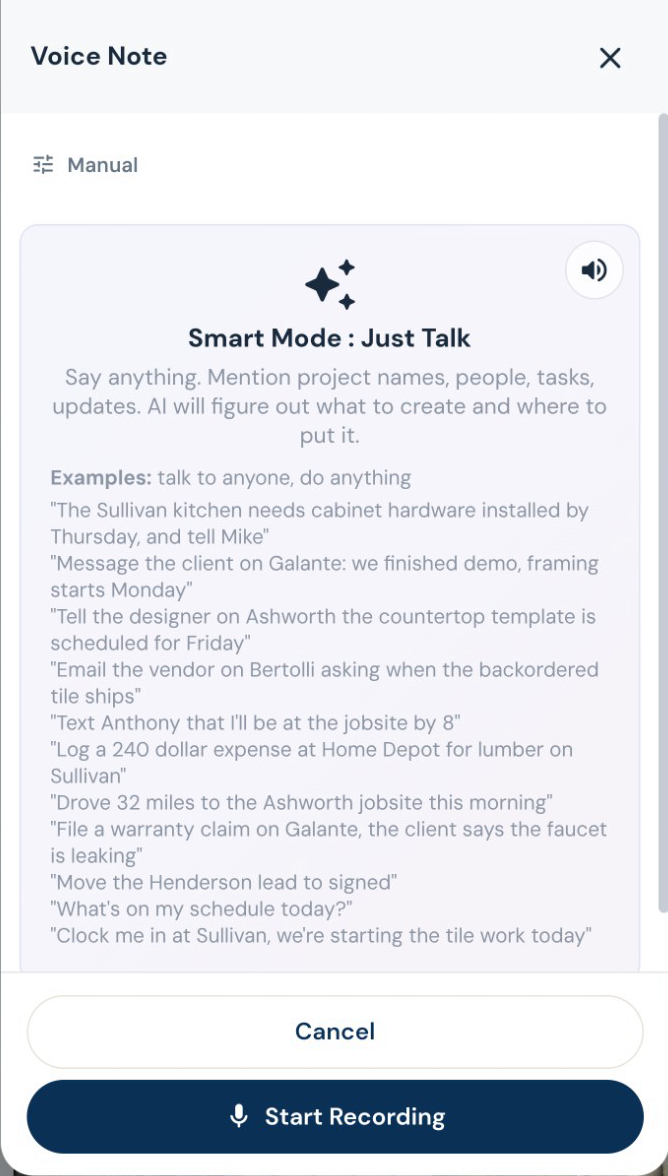
Voice everywhere it makes sense. Spec a cabinet. Mark parts cut. Note QC results. Sign for delivery. Your assembly guy's hands are covered in glue — he shouldn't be typing on an iPad.
On top of the cut list AI, the shop floor kanban, the QC system, the delivery manifests, and the customer portal — your tenant account also gets every piece of the platform every other contractor on RoxyPM gets.
Book a 20-minute walkthrough. I'll show you the cut list AI, the shop kanban, and the QC flow from a real job — yours, if you bring one.
14-day free trial. Full access. Cancel anytime.
Enterprise plans available for shops with 10+ PMs. Contact sales
14 days. Full access. Cancel anytime.
Cancel anytime. Your data stays yours.
No paid endorsements. No incentivized reviews. These contractors actually pay for the platform.
"I paid someone full-time for an entire month to onboard my company into JobTread. On this platform I did it myself in a couple days."
"One of the best systems I\'ve ever used. Now I have everything I had between 3 different CRM softwares and I don\'t even have to take my project notebook with me anymore."
"Amazing software. Can\'t recommend enough. This saves me countless hours every week and frees up so much time that I used to spend writing estimates and contracts."
Type the cabinet — width, depth, height, doors, drawers, shelves, style — and click generate. The system builds every part with the right material assignment and edge banding flags. Works for base, wall, tall, vanity, drawer banks, corner cabinets, and custom one-offs. You can override any part dimension before locking the cut list.
Yes. The 8 checks per stage ship as defaults, but you can edit, add, or remove checks per shop. Some shops want 6 checks, some want 10. Some want a "no warpage" check on door panels. The auto-pass logic adapts to whatever check list you set.
Yes. RoxyPM doesn't replace your CAM software — it sits alongside it. Cut list parts are exportable as CSV for any nesting software. CNC operators mark parts cut as they run them, by scanning the part tag with their phone.
Yes. PM at the jobsite signs for the manifest on iPad. Typed name plus on-screen signature. Time stamped. Damaged-at-receipt notes log right there with photos. Three weeks later when somebody asks if a specific cabinet was delivered, the answer is in the file.
Upload that builder's negotiated price sheet under their record. From then on, every job for that builder automatically pulls THEIR pricing. Your PM doesn't have to remember which builder gets which discount. The system does.
No. Month-to-month. Cancel anytime. The 14-day free trial gives you full access to every feature.
We import customers, leads, projects, cut lists, and material libraries from CSV exports of any of the big SaaS platforms. Two-way QuickBooks Online sync handles the books. Tell us what you're on now and we'll handle the migration.
Yes. Every screen, every notification, every form is bilingual EN/ES. Your assembly guy can mark parts assembled in Spanish, your CNC operator can mark cuts in English, and the data is the same in both.
14-day free trial. Full access. Cancel anytime.
Start Your Free Trial